OpenClaw cron jobs: a complete guide to scheduling agent work
OpenClaw gets much more useful once it stops waiting for you to ask every time. Cron jobs are the built-in mechanism that lets the gateway wake an agent on a schedule, run a task in the right session, and optionally deliver the result back to chat. If you want a daily report, a weekly follow-up, a 20-minute reminder, or a quiet background chore, this is the feature that turns OpenClaw from a reactive assistant into an operational system.
OpenClaw cron is the gateway's own scheduler. You define when a job runs, where it runs, what payload it executes, and how the result is delivered.
Scheduled work is one of the biggest practical differences between a demo assistant and a production assistant. Cron is how you move from “answer me now” to “check this every morning,” “send me the summary at 8 a.m.,” or “wake the agent again in 30 minutes.”
What OpenClaw cron actually is
The first important point is conceptual: OpenClaw cron jobs are not your server's Linux cron entries, and they are not some external queue service that just happens to call the agent. Cron lives inside the OpenClaw Gateway. The gateway persists the jobs, tracks the schedule, wakes the agent at the correct time, and manages the handoff to the appropriate session model.
This architecture is why cron can work with OpenClaw-native concepts like heartbeats, main session events, isolated sessions, webhook delivery, and channel-aware announcements. The scheduler is not a thin wrapper. It understands agent execution semantics.
Where OpenClaw cron jobs are stored
By default, jobs are persisted under ~/.openclaw/cron/jobs.json on the gateway host. That persistence matters because restarts do not wipe out your schedules. The gateway loads the cron store into memory and writes it back when jobs change.
The practical rule is simple: treat the file as implementation storage, not as your normal editing interface. Manual edits are only safe when the gateway is stopped. In day-to-day operations, use the OpenClaw cron CLI or the gateway cron API instead.
The four parts of every cron job
OpenClaw cron becomes easy to reason about once you break each job into four decisions.
- Schedule: when should the job run?
- Session target: where should the work run?
- Payload: what should the agent actually do?
- Delivery: what should happen with the output?
Schedule kinds: at, every, and cron
OpenClaw supports three schedule types, and each is useful for a different pattern.
1) at for one-shot jobs
Use at when you want a single future run. This is the right choice for reminders, delayed follow-ups, or “check this again in two hours.” One-shot jobs usually delete themselves after a successful run,
though OpenClaw can also keep them disabled after success if you explicitly change that behavior.
2) every for fixed intervals
Use every when the cadence is interval-based rather than calendar-based. This works well for “run every 15 minutes,” “poll every hour,” or “re-check every 6 hours.” The underlying value is stored as milliseconds,
but good UIs should present it in human terms so nobody has to mentally convert 3,600,000 every time they edit a schedule.
3) cron for calendar schedules
Use cron expressions when you care about a calendar moment such as “7:00 every weekday” or “the first day of the month at 9:00.” OpenClaw accepts standard cron-style expressions and optional IANA timezones.
If no timezone is set, the gateway host's local timezone is used. That makes timezone selection one of the most important production details to verify.
OpenClaw also supports stagger behavior for some recurring top-of-hour schedules to avoid synchronized load spikes across many gateways. That is useful operationally, but for exact-time business workflows, you should be explicit when you need exact timing and understand whether the job has an intentional stagger window.
Session targets: main, isolated, current, and custom sessions
The next design choice is where the work runs. This is a big one because it affects context reuse, output visibility, and how noisy the automation becomes.
Main session
A main-session cron job enqueues a system event into the main OpenClaw context. This is the best fit when the task should behave like normal heartbeat work and benefit from the shared main-session context. For example: “Every morning, remind the main agent to summarize the roadmap and today's priorities.”
Isolated session
An isolated cron job runs a dedicated agent turn in a cron session such as cron:<jobId>. This keeps recurring chores away from your main conversational history. It is usually the best choice for noisy reporting,
automation loops, or background jobs that should not clutter the main agent context.
Current session binding
current binds the job to the session in which the cron was created. That makes sense when a user creates a scheduled follow-up directly from a live conversation and expects the future run to stay anchored to that thread's context.
Named custom sessions
A custom target like session:daily-ops gives you a persistent named session that can accumulate context across runs. This is a powerful pattern for workflows like daily standups, recurring research digests,
or rolling incident summaries where today's run should be aware of yesterday's output.
Payload kinds: system events vs agent turns
OpenClaw supports two payload models, and they map directly to the session targets above.
systemEvent: used for main-session jobs that should enter the heartbeat path.agentTurn: used for isolated or session-specific jobs that should run a dedicated turn.
In practice, systemEvent is more like “inject this reminder or instruction into the main operating loop,” while agentTurn is “start a separate run with this message.”
If you are building a cron job that says “Summarize overnight alerts and post the result,” you usually want agentTurn. If you are waking the main assistant to continue a thread of work, systemEvent may be the better fit.
Wake modes: run now or wait for heartbeat
OpenClaw cron does not just decide whether to wake the agent. It also decides when the wake-up should happen relative to heartbeat processing.
now: trigger an immediate heartbeat or immediate summary handling.next-heartbeat: enqueue the event and let the next scheduled heartbeat pick it up.
If you want fast feedback, use now. If the job is lower priority and should blend into existing heartbeat cadence, use next-heartbeat. This is one of those small configuration choices that can make a system feel either sharp or laggy in production.
Delivery modes: announce, webhook, or none
Delivery controls what happens after the job finishes. This is where OpenClaw cron becomes especially practical because it is not limited to “run something silently.”
Announce
announce delivers output back to a chat target. For isolated jobs, this is the natural choice when the cron is meant to produce something a human should read, such as a morning brief, a weekly KPI digest, or a reminder.
If delivery is omitted for isolated jobs, OpenClaw defaults to announce behavior.
Webhook
webhook sends the finished event payload to an HTTP(S) endpoint. This is useful when cron output feeds another system instead of a human chat surface. For example, you might post a finished summary into an internal automation pipeline or a downstream service.
None
none keeps the work internal. This is right for housekeeping tasks, session preparation, lightweight background analysis, or jobs whose result is only meant to affect stored context rather than produce an outward-facing message.
Model, thinking, timeout, and lightweight context overrides
For isolated agentTurn jobs, OpenClaw lets you override parts of execution. You can set a specific model, choose a thinking level where supported, add a timeout, and optionally request lightweight context bootstrapping.
These controls matter when a cron job has different cost, speed, or context needs than your default agent settings. A daily deep research summary may deserve a stronger model and more thinking time. A high-frequency status check might need the opposite: low latency, strict timeout, and minimal bootstrapping to reduce cost and noise.
How to create and manage OpenClaw cron jobs safely
The recommended management interfaces are the OpenClaw cron CLI and the gateway cron API. Those paths apply validation, keep the gateway's in-memory state consistent, and avoid the risks of live-editing the jobs store.
A good operator workflow usually includes three things: readable schedule summaries, visible next-run and last-run information, and a safe way to edit or disable a job without touching server state directly. That is also why hosted control surfaces matter. Cron is operationally simple only when it is visible.
What the cron UI in OpenClaw Setup actually exposes
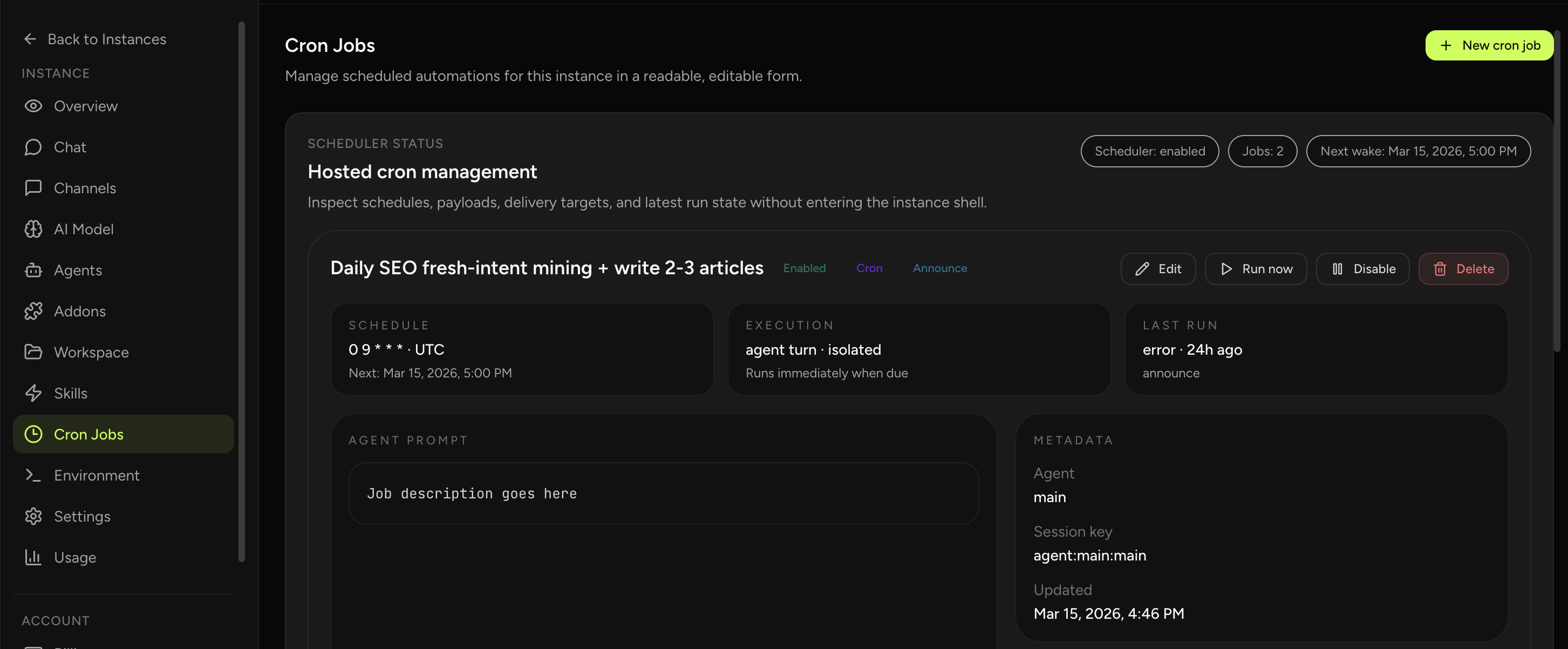
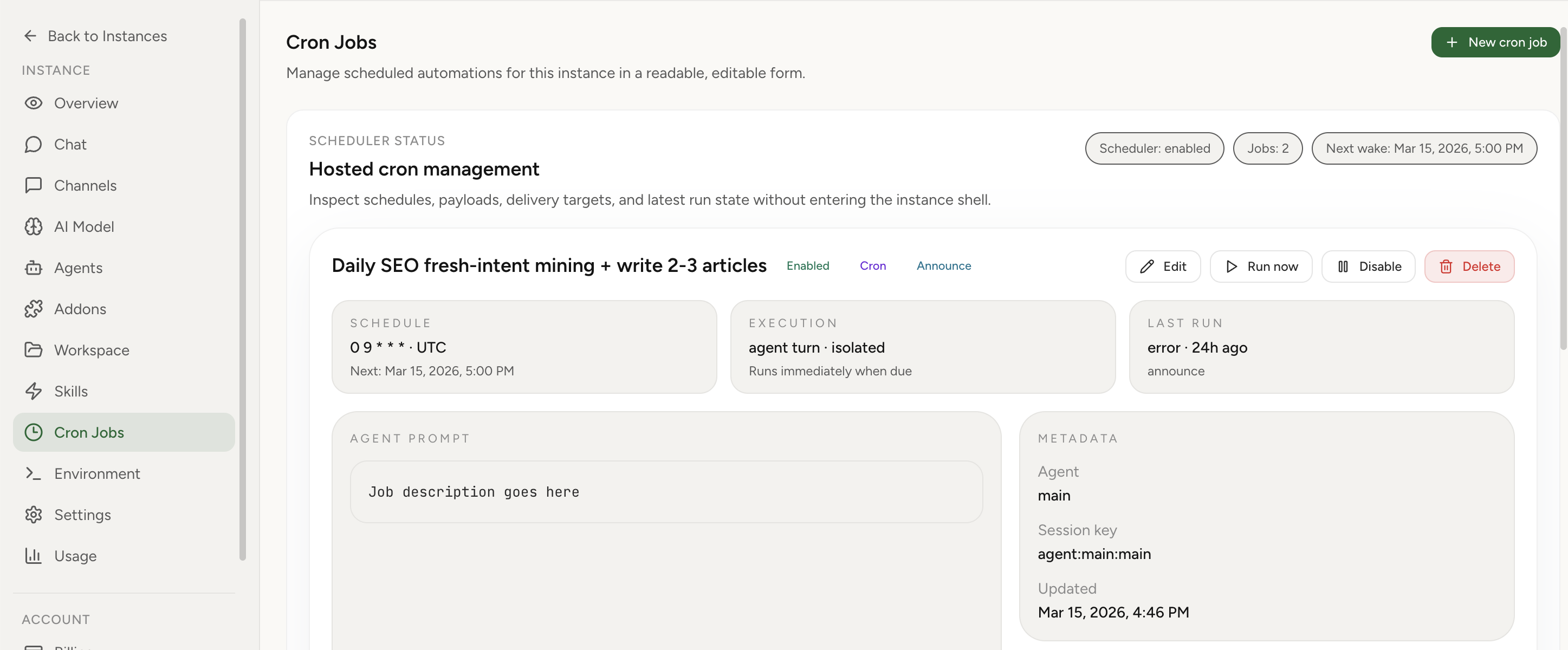
The hosted UI is not just a wrapper around create and delete actions. It exposes the main scheduling and execution controls directly in the dashboard so operators can manage cron jobs without switching back into gateway payloads or storage files.
- Schedule types: one-time
at, repeatingevery, and fullcronexpressions. - Timezone-aware calendar jobs: cron-expression jobs can include an explicit timezone field.
- Session targets: main, isolated, current, and custom named sessions.
- Wake mode: run immediately when due or wait for the next heartbeat.
- Payload type: agent turn or system event.
- Agent-turn overrides: model, thinking level, and timeout.
- Delivery: announce to chat, keep internal, or send to webhook, with channel or recipient override for announce mode.
- Run-state visibility: scheduler status, next wake, latest run status, delivery outcome, and surfaced last-error messages.
Common mistakes teams make with OpenClaw cron
- Using the wrong session target. A noisy recurring job often should be isolated, not attached to the main session.
- Ignoring timezone behavior. If the host timezone is wrong or implicit, “7 a.m.” may not mean what you think.
- Editing the cron store by hand while the gateway is running. That risks corrupting expectations between memory and disk state.
- Not choosing delivery intentionally. Some jobs should announce to chat, some should stay silent, and some should go to webhook targets.
- Treating interval schedules like calendar schedules. “Every 24 hours” is not the same as “at 7 a.m. local time.”
- Skipping operational verification. A cron that exists is not the same as a cron that reliably runs and delivers output.
Popular questions about OpenClaw cron jobs
Can OpenClaw send me reminders?
Yes. One-shot at jobs or recurring schedule jobs are exactly how reminders are implemented.
Should I use cron or heartbeat?
Use cron when you know the task should happen at a specific time or interval. Use heartbeat when you want the main loop to keep pulsing normally and pick up work as part of its regular cycle. The two work together rather than replacing each other.
Can cron jobs keep context between runs?
Yes, if you target a named persistent session such as session:weekly-review. Standard isolated jobs are cleaner for stateless recurring chores, but custom sessions are better when continuity is part of the workflow.
Can I run cron jobs without posting anything to chat?
Yes. Set delivery to none for internal-only jobs, or use webhook delivery if another system should receive the result instead of a chat user.
Why does cron management get messy in self-hosted setups?
Because cron sits at the intersection of schedules, sessions, runtime state, delivery, and infrastructure timekeeping. Once you have several jobs, you need a reliable way to inspect them, edit them, disable them, and confirm that they are still healthy after restarts or upgrades.
Best practices for production cron setups
- Use human-readable job names that describe outcome, not just mechanism.
- Choose isolated sessions for recurring jobs that would otherwise pollute the main assistant context.
- Set explicit timezones for business-critical calendar schedules.
- Use delivery modes intentionally and keep silent jobs truly silent.
- Verify next run, last run, and disabled state from a control surface you trust.
- Test create, edit, run-now, and delete paths before relying on a workflow operationally.
The practical conclusion: cron is much better with a real control panel
OpenClaw's native cron model is powerful, but the operating experience matters as much as the raw feature set. Once you rely on scheduled agents for reporting, reminders, or background automation, you want cron jobs to be visible as readable cards, editable in human language, and easy to create without memorizing JSON shapes or CLI flags.
That is exactly why we added dedicated cron job management to OpenClaw Setup. In our product, you can view configured jobs, edit schedules and payloads, choose session targets and wake mode, control delivery, enable or disable jobs, run them manually, delete them, and create new ones from a modal form in the dashboard. You still get the OpenClaw scheduler model underneath, but you do not have to manage it the hard way.
Migration is simple too. If you already have an OpenClaw instance, OpenClaw Setup can import it with a straightforward zip file upload, so moving existing cron jobs, workspace files, and runtime state is much easier than recreating everything by hand.
If you like OpenClaw's automation model but do not want the maintenance burden of self-hosting every schedule, delivery target, and runtime edge case yourself, start with cron job management, see the broader hosted OpenClaw setup, or compare the tradeoffs on our self-hosting comparison page.
Related reading
Troubleshooting guide for queue stalls, stale runtime state, and safe recovery steps.
Fix OpenClaw cron timeout failuresHow to diagnose slow runs, provider delays, and timeout configuration mistakes.
What is OpenClaw?A practical overview of the OpenClaw gateway, sessions, tools, and common use cases.