OpenClaw skills repositories: what ClawHub is and where to find good skills
If you want to make an OpenClaw agent genuinely useful, skills are where the leverage comes from. The practical question is not just what is a skill? but where do I find good ones without getting buried in noise? This guide answers that directly: what ClawHub is, which repositories are worth checking first, and how to keep your install process sane.
ClawHub is the public OpenClaw skills registry. The best browsing flow is usually: start with ClawHub for discovery, then use curated lists or focused skill repos to find category-specific options faster.
What ClawHub is, exactly
ClawHub is best understood as the public registry and discovery layer for OpenClaw skills. The official `openclaw/clawhub` repository describes it as a public skill registry where skills can be published, versioned, searched, and installed. That distinction matters: ClawHub is not “the thing that makes skills exist,” and it is not just a random GitHub list. It is the ecosystem’s main place for publishing and discovering skills at scale.
In practical terms, ClawHub gives you three things:
- Discovery: browse and search by skill name, category, or use case.
- Distribution: install published skills through ClawHub-aware workflows.
- Version visibility: inspect what a skill is, who published it, and how it evolves over time.
Why you should not rely on one repository alone
There is no single perfect “best skills repo.” Different repositories solve different parts of the problem. Some are official system surfaces, some are curated indexes, and some are focused skill packs maintained by one team. If you only browse one list, you miss either breadth, quality filtering, or concrete examples.
As of March 16, 2026, the most useful pattern is to combine:
- the official registry,
- a curated list that filters the registry, and
- a few focused repositories that show how strong single-purpose skills are built.
The best OpenClaw skills repositories to check first
1. `openclaw/clawhub`
`openclaw/clawhub` is the official registry project. Use it when you want to understand how the public skills ecosystem works, what the CLI supports, and how discovery, publishing, tags, search, and moderation fit together. This is the right starting point if you want the canonical view of ClawHub rather than a third-party summary.
Best for: understanding the registry itself, registry capabilities, and the official install/search model.
2. `VoltAgent/awesome-openclaw-skills`
`VoltAgent/awesome-openclaw-skills` is currently the strongest curated overview repo. Its README says it filters and categorizes thousands of skills from the official registry, with large buckets like GitHub, browser automation, DevOps, search, media, documents, and more. If ClawHub feels too broad, this is usually the fastest way to browse by problem domain instead of scrolling raw listings.
Best for: curated browsing, category discovery, and finding candidates faster than raw registry search.
3. `JimLiu/baoyu-skills`
`JimLiu/baoyu-skills` is a good example of a focused skill pack. Its README shows a bundle of content, publishing, image-generation, and utility skills, and it explicitly documents publishing those skills into ClawHub individually. This makes it useful not only as something to install from, but as a model for how one maintainer can organize a cohesive family of related skills.
Best for: content and publishing workflows, plus learning how a multi-skill repository can map into ClawHub releases.
4. `0xNyk/xint`
`0xNyk/xint` is not a giant directory of many skills. It is a focused repository for an X/Twitter intelligence CLI that is designed to be usable as an AI agent skill. This is the kind of repo worth watching when you want one sharp capability instead of a marketplace bundle: search, monitoring, analysis, and structured exports around one domain.
Best for: social monitoring and research workflows, and for seeing how a single-purpose agent skill repo is packaged.
5. `YouMind-OpenLab/nano-banana-pro-prompts-recommend-skill`
`YouMind-OpenLab/nano-banana-pro-prompts-recommend-skill` is another useful focused repository. It packages a specific image-prompt recommendation workflow for OpenClaw and documents both ClawHub installation and direct GitHub-based installs. Repos like this are useful because they show the practical end state of a polished domain-specific skill instead of only listing thousands of options.
Best for: creative/media prompt workflows and understanding how a specialized skill can be documented for real users.
A sane browsing flow that actually works
If you are trying to build an OpenClaw agent that ships work rather than just collecting shiny plugins, use this order:
- Search ClawHub to understand what already exists.
- Use the VoltAgent awesome list to narrow by category.
- Open the maintainer repository and inspect the underlying skill source.
- Read `SKILL.md`, scripts, and required environment variables before you install.
- Install only the smallest set of skills needed for one real workflow.
Start with one discovery surface, one archive surface, and one focused skill repo. That gives you breadth, inspectability, and a real implementation example without turning your agent into a junk drawer.
How to judge whether a skills repository is actually good
- Clear `SKILL.md` instructions: vague prompts are a bad sign.
- Visible runtime requirements: required env vars, CLIs, or APIs should be explicit.
- A narrow purpose: the best skills usually solve one job well.
- Recent activity: abandoned repos tend to rot fast when toolchains move.
- Install path clarity: the repo should say whether it expects ClawHub, manual install, or both.
Security note: discovery is easy, trust is the hard part
Do not confuse “publicly listed” with “safe by default.” A public registry is useful, but agent skills still deserve the same skepticism you would apply to random scripts or plugins. That means checking what commands they run, what secrets they need, and whether they pull in network or filesystem behavior you do not actually want.
If you want a broader background on skill safety and the OpenClaw ecosystem, read the OpenClaw skills guide alongside this page.
In OpenClaw Setup, skills are easy on purpose
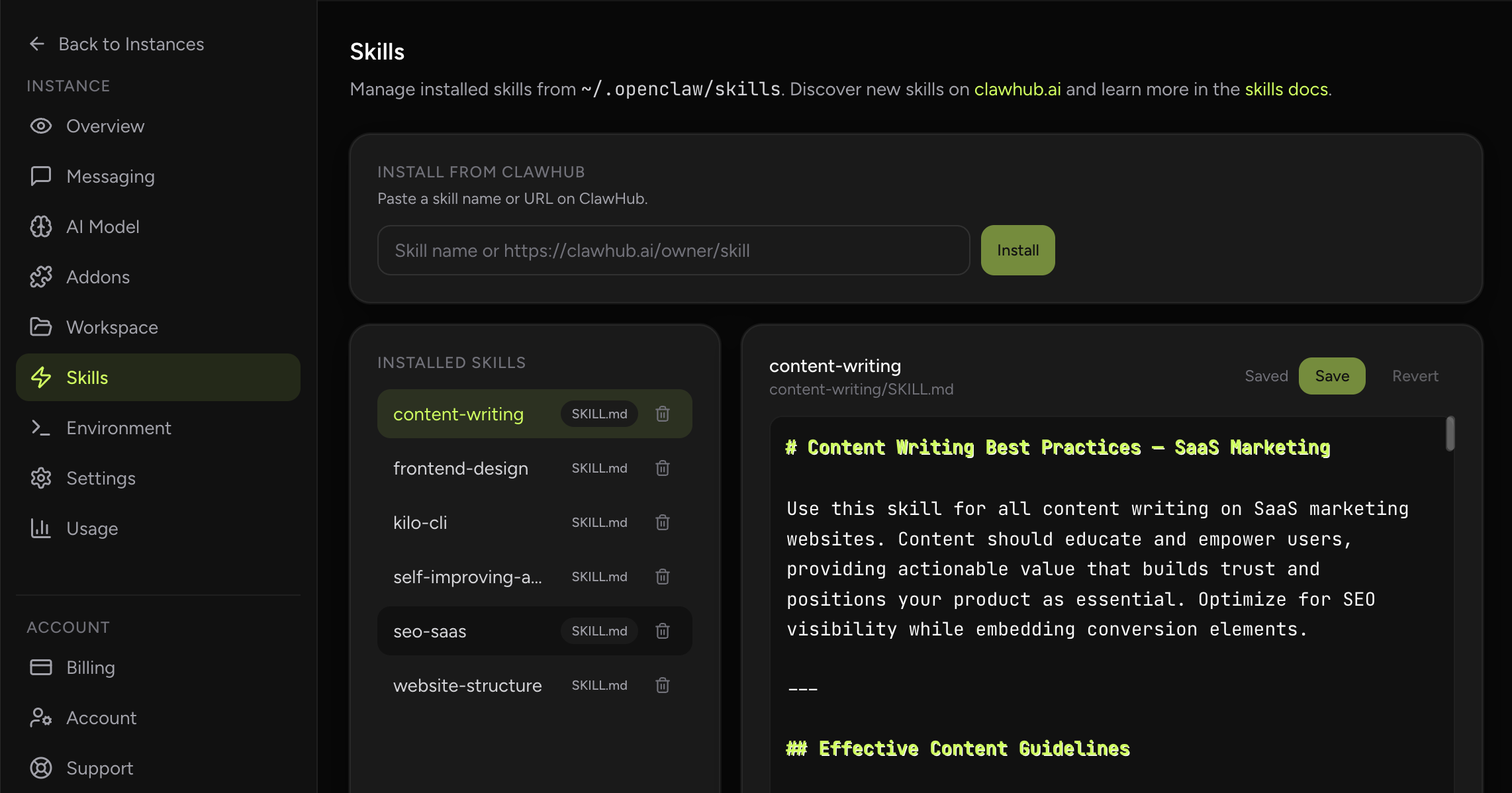
In this product, installing and managing skills is intentionally much simpler than doing everything by hand. ClawHub comes pre-installed and configured, and users get a dedicated skills management tab where they can review, add, or delete skills for each of their agents.
That means you still get the OpenClaw skills ecosystem, but without turning normal operations into a manual filesystem exercise. It is a better fit for people who want the power of skills without spending their day SSHing into runtime containers.