Easy to use, plans support multiple bots. UI to edit Environment variables, Skills, Workspace editor. Uptime/Stability is good. The maintainer is active on Telegram, responded and fixed in issue for me within 5 minutes. I have the tech skill to manage openclaw myself, but will continue here, because its been easy
Managed OpenClaw cloud hosting · Built-in chat + Telegram + Slack
OpenClaw cloud hosting.
To go all-in.
Most feature-rich managed OpenClaw hosting. See why.
From $3.9/mo. Already running OpenClaw elsewhere? Import your current instance in about a minute.
OpenClaw
Online
★ 5/5 on G2 Isolated runtime Encrypted credentials No public IP 500+ LLMs Telegram & Slack 99.9% uptime target From $3.9/mo
User feedback
Rated 5/5 on F6S & G2.
Real user feedback from F6S and G2.
Seamless to use, easy to setup, responsive and quick website overall a very well put together product.
It is a revelation! Setting up OpenClaw (or Clawdbot/Moltbot) is quite tricky for non-technical people like myself. Using this service makes it a breeze, and I was up and running with my personal instance in just a few easy clicks. Game changer.
Easy to set up, secure and very useful as an executive assistant.
Open Claw setup is the easiest and fastest way to set up Open Claw without having to run your own device at home 24/7. On top of that, it's super easy to use and very affordable.
I almost didn't run into any issues and I was able to set up every integration that I wanted. Also, the founder has been really helpful in addressing a few small issues. I love that it's very affordable, and I don't have to do any setup. It just works.
AI agents is a future of efficiency. OpenClaw Setup helps you set up AI agent in a user friendly, affordable way without buying Mac Mini.
Sources: F6S OpenClaw Setup profile · G2 Reviews
Setup in 2 minutes
As simple as it gets.
01
Configure LLM
Pick your provider — OpenAI, Anthropic, Gemini, and more. Add your API key or use OAuth.
02
Add channels
Optionally configure Telegram or Slack as ways to chat with your agent, or skip this and start chatting instantly via built-in chat in your instance dashboard.
03
Chat
Your assistant is live. Chat in the dashboard immediately with reusable sessions and file uploads, or connect Telegram/Slack. Monitor usage in the dashboard.
Dashboard
Most feature-rich OpenClaw hosting.
OpenClaw Setup makes you a power user from day one.
- Human-friendly cron job management with create, edit, run-now, and delete controls
- Full workspace editor and built-in skills management
- Environment variable control with managed restart flow
- Proprietary browser control bridge for real Chrome automation
- 500+ LLM choices with flexible provider auth modes
- Per-model usage and cost tracking, plus instance operations in one dashboard
- Multiple isolated agents in one instance, with Built-In Chat agent picker and Telegram/Slack routing
- Comes with all the necessary software pre-installed: ClawHub, npm, pip, bun, Git, Python, and more
app.openclaw-setup.me/app/instances
Usage 12,847 tokens
Requests42
Models2 active
Runtime Running
Modelclaude-4-5-sonnet
Versionlatest
Per-model cost
| Model | Tokens | Cost |
|---|---|---|
| claude-4-5-sonnet | 8,420 | $0.12 |
| gpt-4o-mini | 4,427 | $0.06 |
What's included
Batteries included.
Every instance ships with a full-power runtime and a feature-rich dashboard. No extras to configure, no Docker to wrestle.
Skills Management
Install and edit agent skills from ClawHub directly in dashboard.
Workspace EditorEdit AGENTS.md, memory files, and runbooks inline — no file manager needed.
Web Search ConfigSwitch between Brave Search and Perplexity. Manage API tokens in the UI.
Pre-installed RuntimePlaywright + Chromium, ClawHub, pip, npm, Bun, Git — ready from first boot.
Usage Analytics
Environment Variables Per-model cost tracking with time-series charts and CSV export.
Edit runtime config from dashboard. Managed restart on save — no SSH.
Multi-Provider AuthAPI keys, OAuth, and CLI tokens for OpenAI, Anthropic, Gemini, MiniMax, OpenRouter, and more.
Chrome Extension RelayAttach your real Chrome tab to OpenClaw with secure relay sessions and local node host control.
Cron Job ManagementInspect schedules, edit payloads, create new jobs, and run or delete automations directly from Overview.
QMD MemoryHybrid BM25 + vector search for smarter, more accurate long-term recall.
Multi-Agent RoutingCreate separate agents, use them from Built-In Chat, and route Telegram/Slack conversations to the right specialist.
Workspace Export
Download your full workspace as .tar.gz anytime. Secrets excluded. No lock-in.
Product showcase
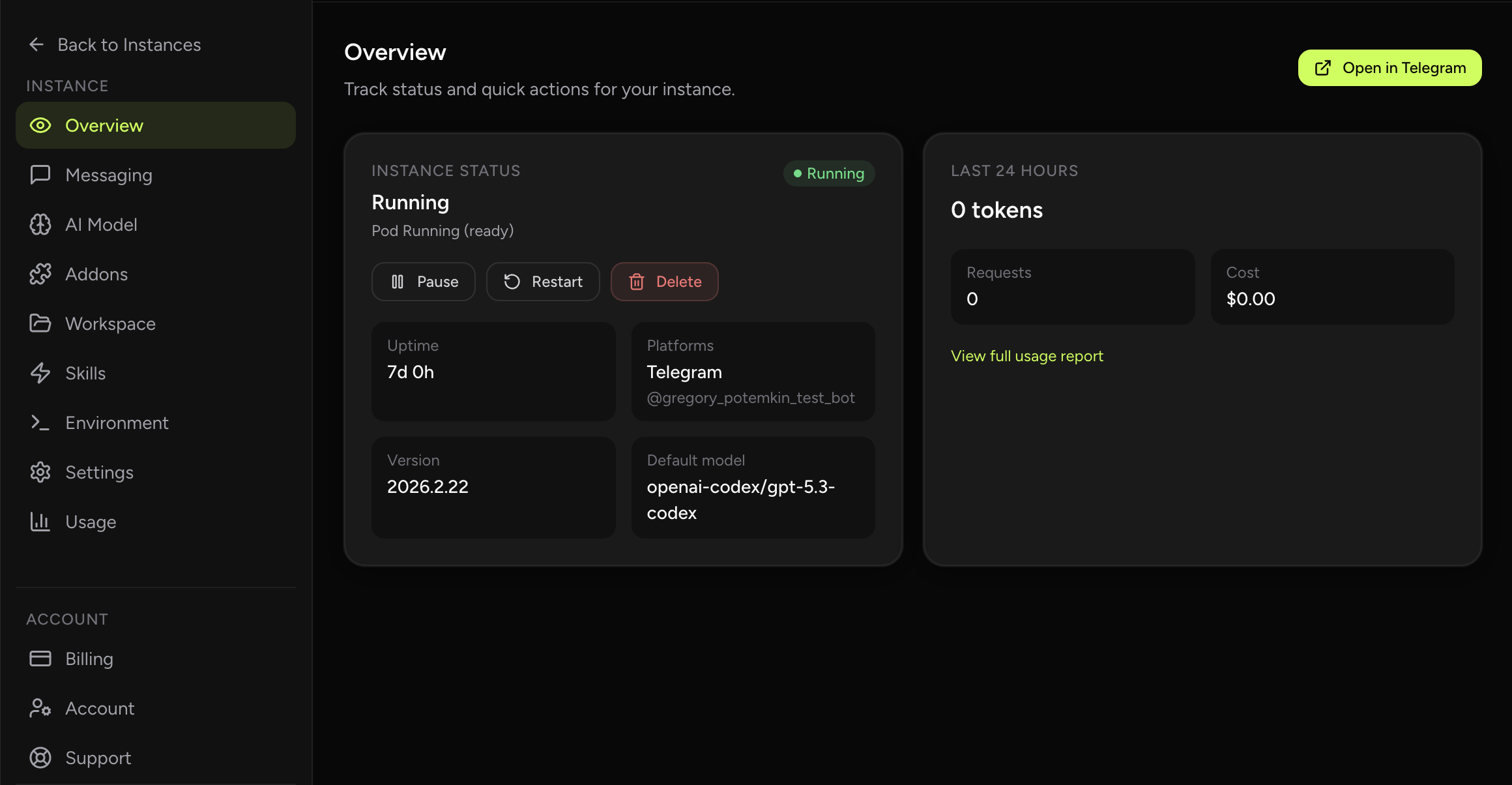
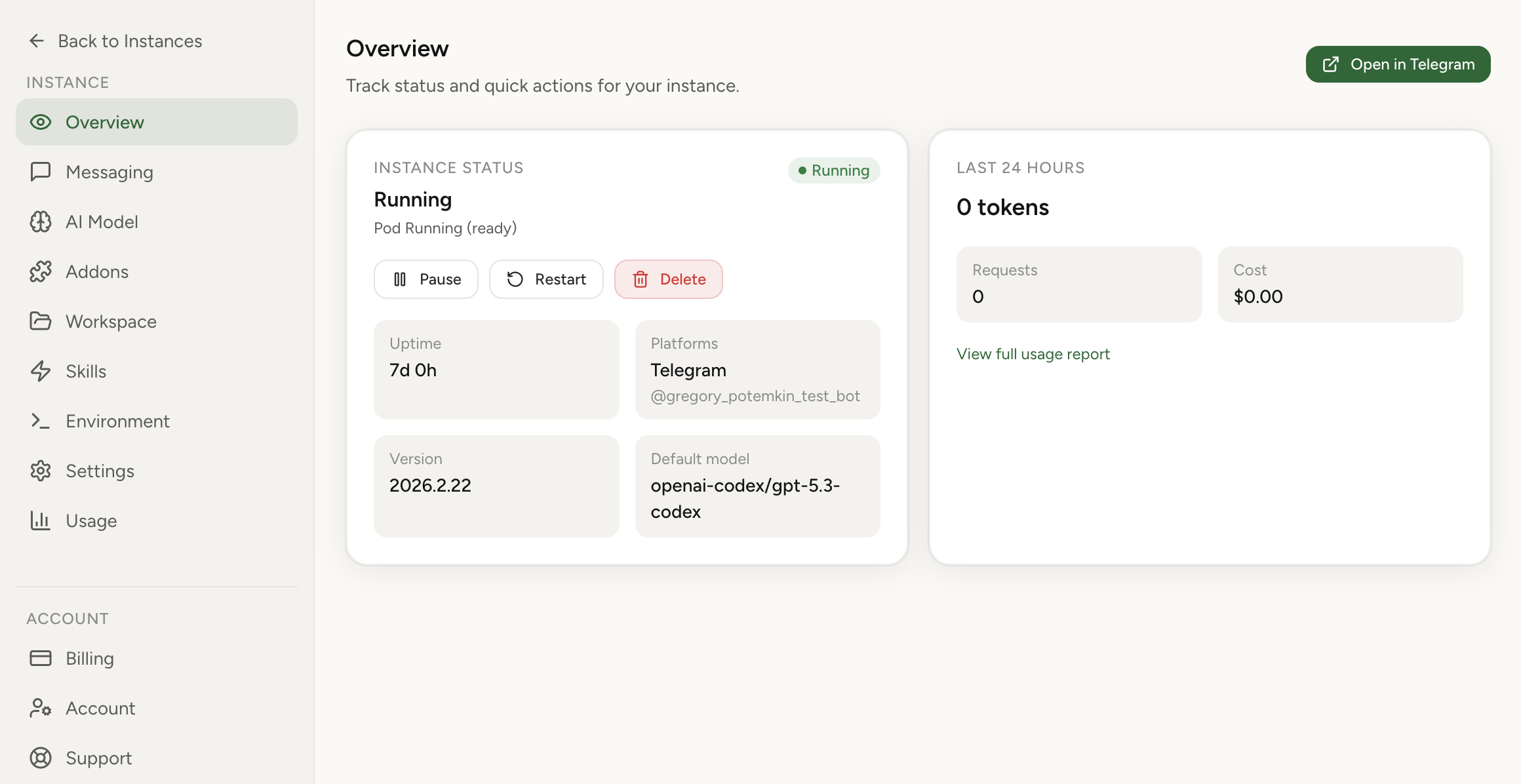
See the real interface.
Actual screenshots from OpenClaw Setup. Switch views to inspect security controls, skills, integrations, workspace tooling, and multi-agent routing.
What’s New
Skills discovery got much easier.
There is a new practical guide on what ClawHub is, where to find strong OpenClaw skills, and which repositories are worth browsing first when you want your hosted agent to do more than the default install.
New guide
ClawHub + OpenClaw skills repositories
The guide covers the official ClawHub registry, the `openclaw/skills` archive, VoltAgent’s curated awesome list, and a few focused repositories that are worth copying ideas from or installing directly.
Why OpenClaw Setup
Built different.
01
Secure by architecture
Isolated runtime environment, encrypted credentials at rest, no public endpoint exposure. Your assistant runs with full capability inside its own isolated boundary.
02
Full execution power
Security doesn't cap what your assistant can do. Root-level capability inside your own runtime: run code, install packages, execute workflows. The isolation protects boundaries, not capabilities.
03
No lock-in
Export your workspace and config anytime as a .tar.gz archive. Secrets excluded. Leave whenever you want — your data goes with you. Listed as most secure option on BestClawHosting.
04
24-hour update cycle
New official OpenClaw releases are supported within 24 hours. Your instance stays current with a single click — no manual migration work, no downtime planning.
Operational layer
- Uptime target: 99.9% for the managed hosting layer.
- Security baseline: no public IP exposure, isolated runtime boundaries, AES-256-GCM credential encryption, allowlist-only messaging access.
- Updates: daily rollout cadence for security hardening, base OpenClaw updates, and stability improvements.
- Support: contact via email or Telegram; typical response within 1 hour, no later than 12 hours.
Pricing
Plan for any workload.
You keep direct control of LLM spend with your own API keys. Pay only for the hosting — not the tokens. Need shared billing for a team? Business accounts let one owner invite members and share plan capacity.
Solo
One assistant in production. Everything you need to get started.
$3.9 /month
- 1 active instance
- Telegram & Slack integration
- Choice of 500+ LLMs
- Dashboard control panel
- ClawHub skills marketplace
- Workspace export anytime
1 vCPU CPU
3 GB RAM
20 GB Storage
Trio
Up to 3 parallel assistants — separate workflows, one account.
$9.9 /month
- Up to 3 active instances
- Telegram & Slack integration
- Choice of 500+ LLMs
- Dashboard control panel
- ClawHub skills marketplace
- Workspace export anytime
1 vCPU CPU / instance
3 GB RAM / instance
20 GB Storage / instance
Orchestra
Up to 10 parallel assistants for larger teams and environments.
$29.9 /month
- Up to 10 active instances
- Telegram & Slack integration
- Choice of 500+ LLMs
- Dashboard control panel
- ClawHub skills marketplace
- Workspace export anytime
1 vCPU CPU / instance
3 GB RAM / instance
20 GB Storage / instance
Need higher instance counts or expanded compute? Contact us for a custom plan.
FAQ
Clear answers.
Is my assistant exposed to the public internet?
No. Your instance has no public IP and is not directly reachable from the public internet. Traffic flows through a private network boundary — random internet scanning cannot reach your assistant.
Can anyone message my bot?
No. You configure an allowlist of approved Telegram users, groups, or Slack users and channels. Only people you explicitly approve can message the assistant.
Does isolation limit what my assistant can do?
No. Isolation protects network and runtime boundaries, but your assistant has full root-level capability inside its own environment. It can run code, install packages with pip/npm/brew, use the browser, and execute any workflow you define.
How fast can I start?
With your LLM provider credentials ready, the full setup takes about 2 minutes. You can chat in built-in chat immediately, then optionally connect Telegram or Slack step by step.
Is built-in chat available, or do I need Telegram/Slack?
Built-in chat is available by default. You can use your assistant directly in OpenClaw Setup without connecting any external messaging platform. Telegram and Slack are optional if you want external channels.
Do you offer uptime guarantees?
We operate with a 99.9% uptime target for the managed hosting layer. Actual availability can still be affected by third-party dependencies (for example Telegram, Slack, or your chosen LLM provider) and planned maintenance windows.
How do I control token spend?
The dashboard shows token usage and cost broken down by model and time period. You can spot spikes immediately and tune your assistant's behavior accordingly. You supply your own API keys — we don't add markup on LLM costs.
Can a team share one billing plan?
Yes. Business accounts let one owner invite members by email, keep billing on the owner's plan, and share the same instance capacity across the team. Members still deploy from their own accounts. See business accounts →
Is Chrome Extension supported?
In Addons → Chrome Extension, generate a short-lived relay session, run the local node host command on the machine where Chrome is running, then authenticate extension options with OPENCLAW_GATEWAY_TOKEN. Finally, open the target tab and click the extension icon until badge shows ON to attach the tab for browser tasks.
Why not just self-host?
Self-hosting is valid for infrastructure-heavy teams who want full ownership. But it requires security hardening, maintenance, and operational burden. OpenClaw Setup removes that work with private network defaults, isolated runtime boundaries, managed updates, and clear cost visibility. Read the full comparison →
Is OpenClaw the same as ClawdBot and Moltbot?
Yes — same core project, renamed over time. ClawdBot became Moltbot, and later OpenClaw. The technology lineage is continuous; the branding changed as the project evolved.
Move to managed OpenClaw
without starting over.
Import your current OpenClaw instance, then run it with secure defaults, clear usage tracking, and less ops overhead.
Import your current OpenClaw instance →